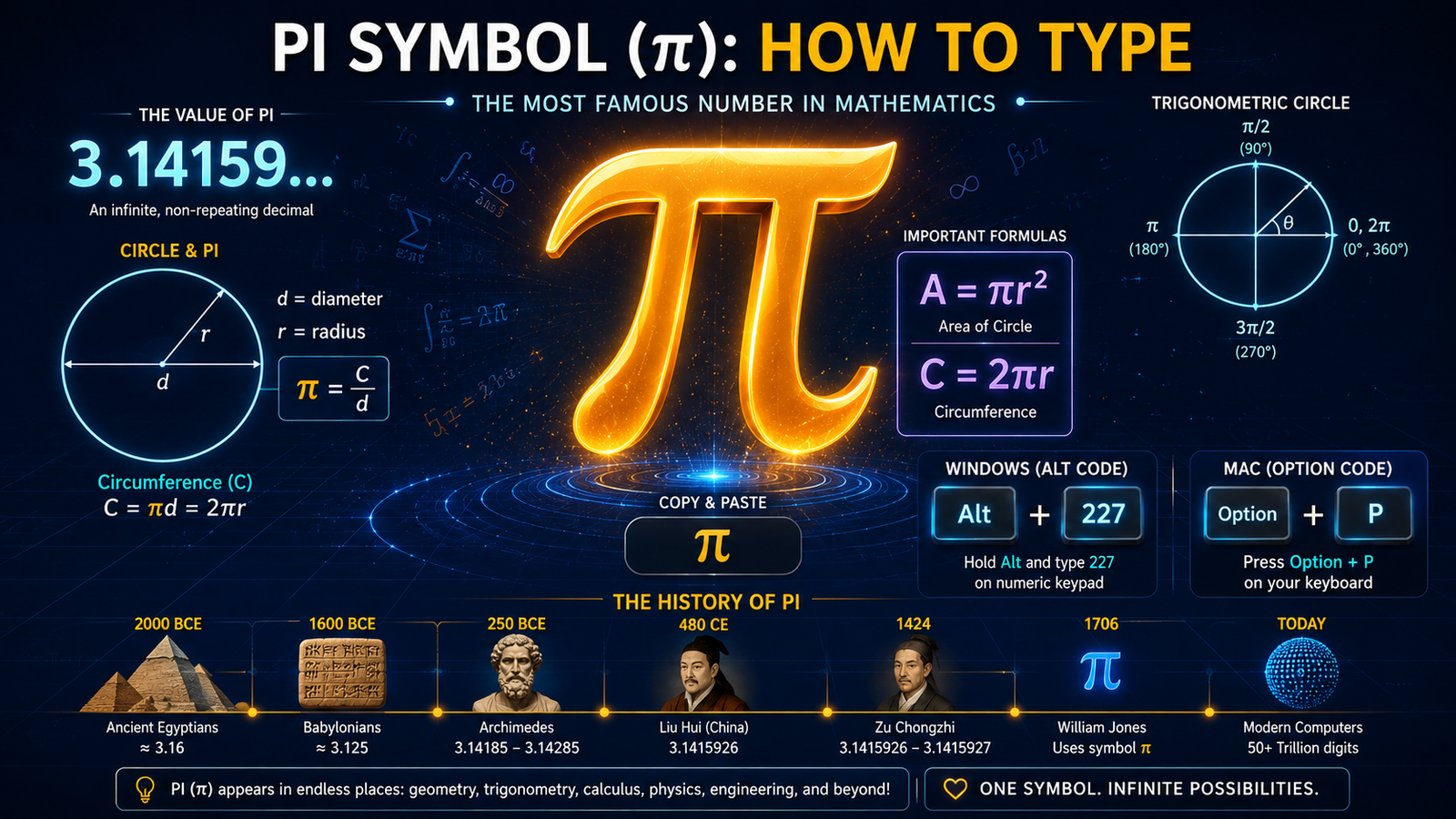
Pi Symbol (π): How to Copy, Paste & Type on Any Device
Introduction
The pi symbol (π) is one of the most important constants in mathematics, representing the ratio of a circle’s circumference to its diameter. Whether you’re a student studying geometry, an engineer working on calculations, a teacher creating materials, or simply interested in mathematics, knowing how to type and use the pi symbol is essential.
This comprehensive guide explains everything about the pi symbol – its mathematical significance, its approximate value of 3.14159, how to copy and paste it, and step-by-step instructions for typing it on Windows, Mac, iPhone, and in software like Microsoft Word and Excel.
The symbol π has been used in mathematics for centuries and appears in countless equations, from calculating circle areas to advanced calculus and physics formulas. Let’s explore how to work with this fundamental mathematical symbol.
Interactive Pi Symbol Copy Tool
Copy Pi Symbol Instantly
Click the copy button below to copy the pi symbol to your clipboard. Then paste it anywhere you need!
Pi Symbol
Click to copy to clipboard
Copy Pi with Value
Need pi with its approximate value? Copy both together:
Pi with Value
Click to copy to clipboard
Copy Common Pi Formulas
Quick copy buttons for frequently used mathematical formulas:
A = πr²
Circle Area
C = 2πr
Circle Circumference
C = πd
Circumference (Diameter)
V = (4/3)πr³
Sphere Volume
A = 4πr²
Sphere Surface Area
e^(iπ) + 1 = 0
Euler’s Formula
Copy Pi Variants
Different representations of pi:
π
Pi Symbol
Π
Capital Pi
∏
Product Symbol
π²
Pi Squared
√π
Square Root Pi
π/2
Pi Half
How It Works
Step 1: Click any “Copy” button above
Step 2: The symbol or formula copies to your clipboard
Step 3: Paste it (Ctrl+V or Cmd+V) anywhere you need
Step 4: No downloads or special software required
Step 5: Works on all devices and browsers
Feedback
Did the copy work? If you see a “✓ Copied!” message, your browser successfully copied the text to your clipboard and you can now paste it anywhere.
What is the Pi Symbol?
Understanding Pi (π)
The pi symbol (π) is a Greek letter that represents a mathematical constant – the ratio of any circle’s circumference to its diameter. It’s one of the most important and famous numbers in mathematics.
The Exact Value
Pi is an irrational number, meaning it cannot be expressed as a simple fraction. Its decimal representation goes on forever without repeating:
π = 3.14159265358979323846…
For most calculations, people use the approximation π ≈ 3.14159 or simply 3.14.
Why It’s Called “Pi”
The symbol π comes from the Greek letter “pi,” which was chosen by mathematician William Jones in 1706 because it’s the first letter of the Greek word “perimetron,” meaning perimeter.
Mathematical Significance
Pi appears in countless mathematical formulas and real-world applications:
- Circle area: A = πr²
- Circle circumference: C = 2πr or C = πd
- Sphere volume: V = (4/3)πr³
- Trigonometry: sin(π/2) = 1
- Complex numbers: e^(iπ) + 1 = 0 (Euler’s formula)
Historical Background
The value of pi has been calculated for thousands of years. Ancient mathematicians approximated it, and modern computers have calculated it to trillions of decimal places. Yet it remains one of mathematics’ greatest mysteries.
Pi Day
March 14 (3.14) is celebrated as Pi Day around the world by mathematicians and enthusiasts who recognize the importance of this fundamental constant.
How to Copy and Paste the Pi Symbol
Easiest Method: Copy-Paste
The simplest way to get the pi symbol is to copy and paste it directly from anywhere online or from this guide.
Step 1: Copy the Symbol
Copy this symbol: π
Step 2: Paste in Your Document
Use the keyboard shortcut:
- Windows: Ctrl + V
- Mac: Cmd + V
- iPhone/Android: Long press and select Paste
Where Copy-Paste Works
This method works in:
- Google Docs
- Microsoft Word
- Excel
- Social media
- Text messages
- Any text field or document
Copy and Paste Examples
You can copy the pi symbol and use it in equations:
- Area = πr² (circle area formula)
- C = 2πr (circumference formula)
- π ≈ 3.14159
- The value of π is approximately 3.14
Advantages of Copy-Paste
- Works on all devices universally
- No special keyboard knowledge needed
- Fastest method for most users
- Copy once, paste multiple times
- No technical barriers or software requirements
How to Type the Pi Symbol on Windows
Method 1: Alt Code (Fastest)
Windows computers have a simple keyboard shortcut using Alt codes.
Steps:
- Hold down the Alt key on your keyboard
- Type 227 on the numeric keypad (not the regular numbers at top)
- Release the Alt key
- The pi symbol π will appear instantly
Important: This only works with the numeric keypad on the right side of your keyboard.
Example: Alt + 227 = π
Method 2: Character Map
If Alt codes don’t work:
- Click the Start menu and search for “Character Map”
- Open Character Map
- Search for “pi” in the search box
- The π symbol appears in the results
- Double-click to select it
- Click Copy button
- Paste (Ctrl + V) in your document
Method 3: Google Docs
- Click Insert menu
- Select “Special characters”
- Search for “pi” or type π
- Click on the symbol
- It inserts into your document
Method 4: Word (Windows)
- Click Insert menu
- Select Symbol
- Search for “pi”
- Click π
- Click Insert
Troubleshooting Alt Codes
If Alt + 227 isn’t working:
- Make sure Num Lock is ON (check for light on keyboard)
- Use numeric keypad on right, not top numbers
- Laptops might need Fn + Alt + 227
- Try copying and pasting instead
How to Type the Pi Symbol on Mac
Method 1: Keyboard Shortcut (Easiest)
Mac has a direct keyboard combination:
- Hold down Option key
- Press P
- Release both keys
- The pi symbol π appears instantly
Shortcut: Option + P = π
Method 2: Character Viewer
If the keyboard shortcut doesn’t work:
- Press Control + Command + Space
- The Character Viewer window opens
- Search for “pi”
- Double-click on π
- The symbol inserts automatically
Method 3: Mac System Preferences
- Go to System Preferences > Keyboard
- Select Input Sources tab
- Add “Unicode Hex Input” if available
- Switch to Unicode Hex Input
- Type 03c0 (Unicode code for pi)
- The symbol π appears
Method 4: Microsoft Word for Mac
- Click Insert menu
- Select Symbol
- Search for “pi”
- Click π
- Click Insert
Troubleshooting Mac
- If Option + P doesn’t work, try Ctrl + Option + P
- Make sure you’re holding Option, not Alt
- Different Mac keyboards might vary
- Use Character Viewer as reliable backup
How to Type the Pi Symbol on iPhone
Method 1: Copy-Paste (Most Reliable)
The simplest method for iPhone:
- Copy the symbol: π
- Long press in the text field
- Select Paste
- The symbol appears
Method 2: Special Characters Keyboard
- Open any text field
- Tap 123 to show numbers
- Tap and hold on symbols like = or +
- Look for pi/special characters menu
- Tap π to insert
Method 3: Search & Copy Method
- Open Safari
- Search “pi symbol copy”
- Copy π from the search results
- Paste in your document
Method 4: Keyboard Shortcuts App
Some iPhone keyboards support custom shortcuts:
- Go to Settings > General > Keyboard > Text Replacement
- Add new shortcut: “pi” → π
- In documents, type “pi” and suggestion appears
- Accept the suggestion
How to Type the Pi Symbol in Microsoft Word
Method 1: Insert Special Character (Easiest for Word)
- Place cursor where you want the symbol
- Click Insert menu at top
- Click Symbol
- Search for “pi”
- Click on π
- Click Insert button
- Click Close
Method 2: Alt Code (Windows)
- Place cursor in document
- Hold Alt key
- Type 227 on numeric keypad
- Release Alt
- π appears immediately
Method 3: Keyboard Shortcut (Mac)
- Place cursor in document
- Press Option + P
- π appears
Method 4: Copy and Paste
- Copy this symbol: π
- In Word document, position cursor
- Press Ctrl + V (Windows) or Cmd + V (Mac)
- Symbol appears
Method 5: Math AutoCorrect
Word has built-in Math AutoCorrect:
- Go to File > Options > Proofing > AutoCorrect Options
- Enable Math AutoCorrect
- In document, type: \pi
- Press Space
- Word converts it to π
How to Type the Pi Symbol in Excel
Method 1: Insert Symbol Menu
- Click on the cell where you want the symbol
- Click Insert menu
- Click Symbol
- Search for “pi”
- Click π
- Click Insert
- Click Close
Method 2: Alt Code
- Click on the cell
- Hold Alt key
- Type 227 on numeric keypad
- Release Alt
- π appears in the cell
Method 3: Copy and Paste
- Copy the symbol: π
- Click on Excel cell
- Press Ctrl + V
- The symbol appears
Method 4: Using PI() Function
For actual mathematical calculations in Excel:
- Click on a cell
- Type the formula: =PI()
- Press Enter
- Excel displays: 3.14159265358979
This calculates pi to high precision rather than just inserting the symbol.
Method 5: Combining Symbol with Text
To show the symbol in formulas:
- Type: =CONCATENATE(“Area = π”, “r²”)
- Press Enter
- Displays: Area = πr²
Pi Symbol Keyboard Shortcut Reference
Quick Reference Table
Windows:
- Alt + 227 = π
Mac:
- Option + P = π
iPhone:
- Copy and Paste π
Google Docs:
- Insert > Special Characters > search “pi”
Microsoft Word:
- Insert > Symbol > search “pi”
Excel:
- Insert > Symbol > search “pi”
HTML/Web:
- π or π
LaTeX:
- \pi
Unicode:
- U+03C0
Pi in Mathematical Equations
Common Formulas Using Pi
Circle Formulas:
- Area: A = πr² (radius squared times pi)
- Circumference: C = 2πr or C = πd
- Arc length: s = rθ (where θ is in radians)
Sphere Formulas:
- Volume: V = (4/3)πr³
- Surface area: A = 4πr²
Trigonometry:
- sin(π) = 0
- sin(π/2) = 1
- cos(π) = −1
- cos(π/2) = 0
- tan(π/4) = 1
Calculus:
- ∫₀^π sin(x)dx = 2
- ∫₀^∞ e^(−x²)dx = √π/2
Euler’s Formula (Complex Numbers):
- e^(iπ) + 1 = 0 (considered one of math’s most beautiful equations)
Pi in Different Contexts:
- π radians = 180 degrees
- 2π radians = 360 degrees
- π/2 radians = 90 degrees
The History and Origin of Pi
Ancient Calculations
The value of pi has been approximated since ancient times:
- Babylonians (1900-1680 BC): Used π ≈ 3.125
- Egyptians (1550 BC): Used π ≈ 3.1605
- Archimedes (250 BC): Calculated π between 3.1408 and 3.1429
- Chinese mathematicians (500 AD): Calculated π to 7 decimal places
The Symbol π
- 1706: William Jones first used π to represent pi in mathematics
- 1737: Leonhard Euler popularized the symbol π
- The symbol comes from Greek “perimetron” (perimeter)
Modern Calculations
- 1949: First computer calculation of 2,037 digits
- 1987: Over 100 million digits calculated
- 2019: Over 31 trillion digits calculated
- 2023: Over 100 trillion digits calculated
Why Pi Matters
Pi is fundamental to understanding circles, spheres, waves, and countless natural phenomena. It appears unexpectedly in probability, complex numbers, and physics equations, making it one of mathematics’ most important constants.
FAQ About Pi Symbol
What is the pi symbol?
The pi symbol (π) is a Greek letter representing the mathematical constant – the ratio of a circle’s circumference to its diameter. Its value is approximately 3.14159 but continues infinitely.
What is the value of pi?
Pi equals 3.14159265358979… It’s an irrational number, meaning the decimal representation never ends and never repeats. Most calculations use π ≈ 3.14159 or even just 3.14.
How do I type the pi symbol on my keyboard?
On Windows: Alt + 227. On Mac: Option + P. On other devices: Copy and paste π. In Word/Excel: Use Insert > Symbol menu.
What is pi used for in math?
Pi appears in circle formulas (A = πr², C = 2πr), sphere calculations, trigonometry, calculus, complex numbers, and countless scientific and engineering applications.
What does pi stand for?
Pi is the 16th letter of the Greek alphabet. The symbol was chosen because it’s the first letter of the Greek word “perimetron,” meaning perimeter or circumference.
Is pi exactly 3.14?
No, 3.14 is just an approximation. The actual value of pi is 3.14159265358979… and continues forever without repeating. It’s an irrational number.
Can I use pi in Excel calculations?
Yes, Excel has a PI() function. Type =PI() in a cell to get pi’s value (3.14159…). You can also use it in formulas like =PI()*A1^2 to calculate circle area.
How many digits of pi are there?
Mathematically, there are infinitely many digits. Practically, modern computers have calculated trillions of digits, though most applications use far fewer.
What devices support the pi symbol?
All modern devices (Windows, Mac, Linux, iPhone, Android, web browsers, tablets) support the pi symbol. Copy-paste works universally on all devices.
Why is pi celebrated on March 14?
March 14 (3/14) is Pi Day because the first digits of pi are 3.14. Mathematicians and enthusiasts celebrate this day to recognize the importance of this mathematical constant.
What is the Greek symbol for pi?
π (lowercase pi) is used in mathematics. Π (uppercase pi) is sometimes used for product notation in mathematics, but π is the standard symbol for the constant.
Who discovered pi?
Pi has been known since ancient times. Mathematicians like Archimedes calculated better approximations, and Leonhard Euler popularized the π symbol in 1737. The exact value has been refined over centuries.
Related Mathematical Symbols
Learn more about other important math symbols:
Aesthetic Symbol Copy And Paste
Conclusion
The pi symbol (π) is one of mathematics’ most important constants, representing the fundamental relationship between a circle’s circumference and diameter. Understanding both the mathematical significance of pi (≈ 3.14159) and how to type it on your device makes working with mathematical content easier and more professional.
Whether you prefer the copy-paste method for simplicity, the Alt code for speed on Windows, or the Option+P shortcut on Mac, you now have multiple reliable ways to insert the pi symbol in any document or application. For those working regularly with mathematics in Word or Excel, knowing the Insert > Symbol method provides quick access whenever needed.
Pi’s appearance in countless mathematical formulas – from basic circle calculations to advanced calculus and physics – makes it essential knowledge for students, teachers, engineers, and anyone working with mathematics. The symbol π itself, derived from ancient Greek, carries centuries of mathematical tradition and continues to be celebrated by mathematicians worldwide on March 14 each year.
Now you’re fully equipped to work confidently with the pi symbol on any device and in any application, whether you’re calculating circle areas, writing mathematical papers, or simply exploring the fascinating world of mathematics!