Delta Symbol (Δ): How to Copy, Paste & Type on Any Device
Introduction
The delta symbol (Δ), also known as the Greek letter delta, is a fundamental mathematical, scientific, and symbolic character used worldwide. Whether you’re a student studying calculus and physics, an engineer working with technical calculations, a spreadsheet user managing data in Excel, or someone interested in Greek letters and symbolism, knowing how to type and use the delta symbol is essential.
This comprehensive guide explains everything about the delta symbol – its mathematical significance, scientific applications, how to copy and paste it, and step-by-step instructions for typing it on Windows, Mac, iPhone, and in Microsoft Word and Excel.
The symbol Δ appears in mathematics, physics, chemistry, and countless other fields, representing change, difference, and variation. Let’s explore how to work with this important symbol across all your devices and applications.
What is the Delta Symbol?
Understanding Delta (Δ)
The delta symbol (Δ), the fourth letter of the Greek alphabet, is one of the most important symbols in mathematics, science, and engineering. It represents change, difference, or variation in quantities.
Mathematical Significance
In mathematics, the delta symbol represents:
- Change or difference between two values: Δx = x₂ − x₁
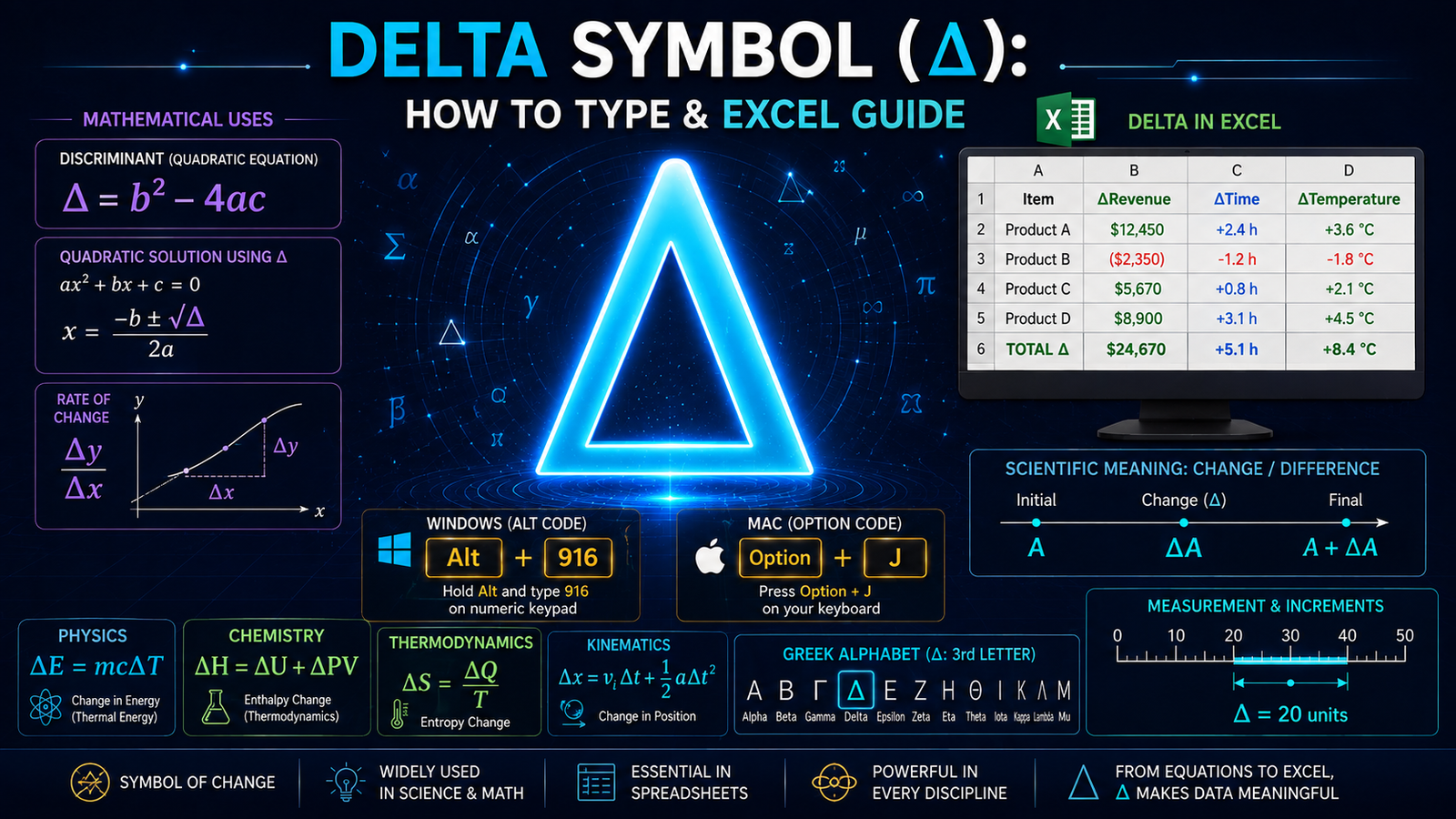
- Discriminant in quadratic equations: Δ = b² − 4ac
- Laplacian operator in calculus: ∇² or Δ
- Variation or increment in variables
- The boundary of a set in topology
Mathematical Examples:
- Δt = t₂ − t₁ (change in time)
- Δy/Δx (rate of change)
- ΔE = E_final − E_initial (change in energy)
- Δ = b² − 4ac (discriminant formula)
Scientific Applications
In science and engineering, delta represents:
- Change in temperature: ΔT
- Change in wavelength: Δλ
- Change in velocity: Δv
- Change in concentration: ΔC
- Change in potential: ΔV
The Greek Letter
Delta (Δ) is the fourth letter of the Greek alphabet, positioned between gamma (Γ) and epsilon (Ε). The capital delta (Δ) is commonly used in mathematics and science, while lowercase delta (δ) has specialized applications in specific fields.
Historical Origin
The delta symbol comes from the Phoenician letter Dalet, which meant “door.” The Greek alphabet adopted this symbol, and it evolved into the modern delta (Δ) we use today. Its use in mathematics dates back to ancient Greek mathematicians and has remained standard for over 2,000 years.
Why It’s Important
The delta symbol appears in:
- Calculus and differential equations
- Physics formulas and quantum mechanics
- Chemistry and thermodynamics
- Engineering calculations
- Statistics and data analysis
- Computer science and algorithms
The Meaning of the Delta Symbol
Mathematical Meaning
In mathematics, delta (Δ) represents change or difference. It’s one of the most powerful and frequently used symbols in mathematical notation because it allows us to express how quantities change.
Key Concepts:
- Δx represents “change in x”
- It’s calculated as: final value minus initial value
- Used in rate of change, derivatives, and integrals
- Essential for understanding calculus and physics
Scientific Meaning
In science, delta indicates:
- A change from an initial to final state
- The difference between measured and theoretical values
- Variation in experimental conditions
- Incremental changes in physical quantities
The Discriminant
In quadratic equations, the discriminant (Δ) determines the nature of roots:
- Δ > 0: Two distinct real roots
- Δ = 0: One repeated real root
- Δ < 0: Two complex roots
Symbol Variations
Different contexts use delta differently:
- Capital Delta (Δ): Change, difference, increment
- Lowercase Delta (δ): Partial derivatives, Kronecker delta, small quantities
- Nabla/Del (∇): Gradient operator (related but different)
- Laplacian (∇²): Second derivative operator
How to Copy and Paste the Delta Symbol
Easiest Method: Copy-Paste
The simplest way to get the delta symbol is to copy and paste it directly from anywhere online.
Step 1: Copy the Symbol
Copy this symbol: Δ
Step 2: Paste in Your Document
Use the keyboard shortcut:
- Windows: Ctrl + V
- Mac: Cmd + V
- iPhone/Android: Long press and select Paste
Where Copy-Paste Works
This method works in:
- Google Docs
- Microsoft Word
- Excel
- Social media
- Text messages
- Any text field or document
- Programming and coding editors
Copy and Paste Examples
You can copy the delta symbol and use it in:
- Equations: Δx = 5 (change equals 5)
- Physics: ΔT = 10°C (temperature change)
- Chemistry: ΔH = −100 kJ (enthalpy change)
- Spreadsheets: ΔRevenue in Excel cells
Advantages of Copy-Paste
- Works on all devices universally
- No special keyboard knowledge needed
- Fastest method for most users
- Copy once, paste multiple times
- No technical barriers or software requirements
- Perfect for social media and messages
How to Type the Delta Symbol on Windows
Method 1: Alt Code (Fastest)
Windows computers have a simple keyboard shortcut using Alt codes.
Steps:
- Hold down the Alt key on your keyboard
- Type 916 on the numeric keypad (not the regular numbers at top)
- Release the Alt key
- The delta symbol Δ will appear instantly
Important: This only works with the numeric keypad on the right side of your keyboard.
Example: Alt + 916 = Δ
Method 2: Character Map
If Alt codes don’t work:
- Click the Start menu and search for “Character Map”
- Open Character Map
- Search for “delta”
- The Δ symbol appears in the results
- Double-click to select it
- Click Copy button
- Paste (Ctrl + V) in your document
Method 3: Google Docs
- Click Insert menu
- Select “Special characters”
- Search for “delta”
- Click on Δ
- It inserts into your document
Method 4: Word (Windows)
- Click Insert menu
- Select Symbol
- Search for “delta”
- Click Δ
- Click Insert
Troubleshooting Alt Codes
If Alt + 916 isn’t working:
- Make sure Num Lock is ON (check for light on keyboard)
- Use numeric keypad on right, not top numbers
- Laptops might need Fn + Alt + 916
- Try copying and pasting instead
How to Type the Delta Symbol on Mac
Method 1: Keyboard Shortcut (Easiest)
Mac has a direct keyboard combination:
- Hold down Option key
- Press J
- Release both keys
- The delta symbol Δ appears instantly
Shortcut: Option + J = Δ
Method 2: Character Viewer
If the keyboard shortcut doesn’t work:
- Press Control + Command + Space
- The Character Viewer window opens
- Search for “delta”
- Double-click on Δ
- The symbol inserts automatically
Method 3: Mac System Preferences
- Go to System Preferences > Keyboard
- Select Input Sources tab
- Add “Unicode Hex Input” if available
- Switch to Unicode Hex Input
- Type 0394 (Unicode code for delta)
- The symbol Δ appears
Method 4: Microsoft Word for Mac
- Click Insert menu
- Select Symbol
- Search for “delta”
- Click Δ
- Click Insert
Troubleshooting Mac
- If Option + J doesn’t work, try Option + D
- Make sure you’re holding Option, not Alt
- Use Character Viewer as reliable backup
- Different Mac keyboards might have slight variations
How to Type the Delta Symbol on iPhone
Method 1: Copy-Paste (Most Reliable)
The simplest method for iPhone:
- Copy the symbol: Δ
- Long press in the text field
- Select Paste
- The symbol appears
Method 2: Special Characters Keyboard
- Open any text field
- Tap 123 to show numbers
- Tap and hold on symbols like = or +
- Look for delta/special characters menu
- Tap Δ to insert
Method 3: Search & Copy Method
- Open Safari
- Search “delta symbol copy”
- Copy Δ from the search results
- Paste in your document
Method 4: Keyboard Shortcuts App
Some iPhone keyboards support custom shortcuts:
- Go to Settings > General > Keyboard > Text Replacement
- Add new shortcut: “delta” → Δ
- In documents, type “delta”
- Accept the suggestion
How to Type the Delta Symbol in Microsoft Word
Method 1: Insert Special Character (Easiest for Word)
- Place cursor where you want the symbol
- Click Insert menu at top
- Click Symbol
- Search for “delta”
- Click on Δ
- Click Insert button
- Click Close
Method 2: Alt Code (Windows)
- Place cursor in document
- Hold Alt key
- Type 916 on numeric keypad
- Release Alt
- Δ appears immediately
Method 3: Keyboard Shortcut (Mac)
- Place cursor in document
- Press Option + J
- Δ appears
Method 4: Copy and Paste
- Copy this symbol: Δ
- In Word document, position cursor
- Press Ctrl + V (Windows) or Cmd + V (Mac)
- Symbol appears
Method 5: Math AutoCorrect
Word has built-in Math AutoCorrect:
- Go to File > Options > Proofing > AutoCorrect Options
- Enable Math AutoCorrect
- In document, type: \Delta
- Press Space
- Word converts it to Δ
How to Type the Delta Symbol in Excel (EASIEST – 9-12% Difficulty!)
Method 1: Insert Symbol Menu (BEST for Excel)
- Click on the cell where you want the symbol
- Click Insert menu
- Click Symbol
- Search for “delta”
- Click Δ
- Click Insert
- Click Close
This is the fastest method in Excel!
Method 2: Alt Code
- Click on the cell
- Hold Alt key
- Type 916 on numeric keypad
- Release Alt
- Δ appears in the cell
Method 3: Copy and Paste
- Copy the symbol: Δ
- Click on Excel cell
- Press Ctrl + V
- The symbol appears
Method 4: Using Formulas with Delta
For labeling and formulas:
- Click on a cell
- Type: =CONCATENATE(“Δx = “, 5)
- Press Enter
- Displays: Δx = 5
Method 5: Direct Cell Entry
- Type delta in Excel cell
- Manually replace with Δ symbol
- Perfect for headers: ΔRevenue, ΔTime, ΔEnergy
Excel Tips for Delta Symbol
- Use in column headers for change/difference columns
- Perfect for scientific data analysis
- Great for financial models showing variance
- Ideal for engineering spreadsheets
- Makes calculations more professional
Delta Symbol Keyboard Shortcut Reference
Quick Reference Table
Windows:
- Alt + 916 = Δ
Mac:
- Option + J = Δ
iPhone:
- Copy and Paste Δ
Google Docs:
- Insert > Special Characters > search “delta”
Microsoft Word:
- Insert > Symbol > search “delta”
Excel:
- Insert > Symbol > search “delta” (EASIEST!)
HTML/Web:
- Δ or Δ
LaTeX:
- \Delta
Unicode:
- U+0394
Delta in Different Mathematical Contexts
Quadratic Equations
The discriminant (Δ) determines the nature of solutions:
Formula: Δ = b² − 4ac
For equation: ax² + bx + c = 0
Example: 2x² + 5x + 3 = 0
- Δ = 5² − 4(2)(3) = 25 − 24 = 1
- Since Δ > 0, two distinct real roots exist
Calculus and Derivatives
Delta represents infinitesimal change:
Rate of Change: Δy/Δx = (y₂ − y₁)/(x₂ − x₁)
Derivative Definition: f'(x) = lim(Δx→0) [f(x + Δx) − f(x)]/Δx
Physics Equations
Common physics applications:
- Kinematic: Δx = v₀t + ½at²
- Energy: ΔE = mcΔT
- Work: W = ΔKE = ½m(v₂² − v₁²)
- Thermodynamics: ΔH = ΔU + ΔPV
Statistics and Data Analysis
Delta in statistical context:
- Standard Error: Represents variation in measurements
- Confidence Intervals: Δ shows margin of error
- Hypothesis Testing: Δ represents difference from expected value
Delta Symbol in Scientific Fields
Chemistry
In chemical equations and thermodynamics:
- ΔH = Change in enthalpy
- ΔS = Change in entropy
- ΔG = Change in Gibbs free energy
- ΔT = Change in temperature
Physics
In physics and mechanics:
- Δv = Change in velocity
- Δp = Change in momentum
- ΔE = Change in energy
- Δt = Change in time
Engineering
In engineering calculations:
- ΔF = Change in force
- ΔP = Change in pressure
- ΔR = Change in resistance
- Δλ = Change in wavelength
FAQ About Delta Symbol
What is the delta symbol?
The delta symbol (Δ) is the fourth letter of the Greek alphabet, commonly used in mathematics and science to represent change, difference, or variation between two values.
What does delta mean in math?
In mathematics, delta (Δ) represents change or difference. For example, Δx means “change in x” and is calculated as the final value minus the initial value.
How do I type the delta symbol on my keyboard?
On Windows: Alt + 916. On Mac: Option + J. On other devices: Copy and paste Δ. In Microsoft Word or Excel: Use Insert > Symbol menu and search for delta.
What is delta used for in science?
Delta is used in science to represent changes in physical quantities. Examples: ΔT for temperature change, ΔE for energy change, Δv for velocity change.
How do I insert delta in Excel?
Click on the cell, go to Insert > Symbol, search for “delta,” click Δ, and click Insert. Alternatively, use Alt + 916 on Windows or copy and paste.
What is the discriminant (delta) in quadratic equations?
The discriminant (Δ = b² − 4ac) determines the number and type of roots: Δ > 0 means two real roots, Δ = 0 means one root, Δ < 0 means two complex roots.
What is the difference between capital and lowercase delta?
Capital delta (Δ) is used for changes and increments in mathematics and science. Lowercase delta (δ) has specialized uses in partial derivatives and specific mathematical contexts.
What is the Unicode for delta symbol?
The Unicode for capital delta is U+0394. In HTML, you can use Δ or Δ to display the symbol on web pages.
Is delta the same as the triangle symbol?
No, delta (Δ) is a Greek letter. The triangle symbol (△) is a geometric shape. While they look similar, they have different meanings and uses.
Can I use delta in programming?
Yes, many programming languages support the delta symbol. You can copy and paste it, or use Unicode escape sequences like \u0394 in languages that support Unicode.
Specialized Delta Uses
Stock Market Context
In finance, delta can refer to:
- Delta Airlines Stock: NYSE symbol DAL
- Options Trading: Delta measures option price sensitivity
- Portfolio Delta: Measures overall directional risk
Greek Letter Organizations
- Delta Sigma Theta: African-American sorority
- Kappa Delta: Women’s fraternity
- Alpha Epsilon Delta: Pre-health honor society
- Delta Gamma: Women’s fraternity
These use the Greek delta (Δ) as part of their formal names and symbols.
Advanced Mathematics
Specialized uses in advanced fields:
- Kronecker Delta (δ): Symbol in tensor analysis
- Dirac Delta Function: Generalized function in physics
- Laplacian Operator (∇²): Second derivative operator
- Variation (δ): In calculus of variations
Related Mathematical Symbols
Learn more about other important math symbols:
Conclusion
The delta symbol (Δ) is far more than just a Greek letter – it’s a fundamental tool for expressing change, difference, and variation across mathematics, science, engineering, and countless other fields. Understanding both its mathematical significance and how to type it on your devices makes working with technical and scientific content significantly easier.
Whether you’re solving quadratic equations where the discriminant determines the nature of roots, analyzing data in Excel where delta represents change, studying physics where delta indicates changes in energy or motion, or simply exploring Greek letters and their symbolism, you now have multiple reliable methods to access this essential symbol.
The delta symbol’s versatility – from academic mathematics to professional engineering, from scientific research to financial modeling – demonstrates why mastering its use is valuable. With Alt + 916 on Windows, Option + J on Mac, and copy-paste available universally, you have quick access to this symbol across all your devices and applications.
Now you’re fully equipped to work confidently with the delta symbol anywhere you need it, understanding both its profound mathematical meaning and its practical application across countless fields of study and professional disciplines!