Font Generator – Free Online Tool to Create Stylish Text
Sometimes words just appear boring when written in the same style everywhere. You can change that with a Font Generator. It helps you to turn normal text into stylish, fancy, and eye-catching fonts in seconds.
On our site, you get a fast and free Font Generator that works online. You do not need to install anything or sign up. You will just type, style, and copy.
Generating Fancy Text
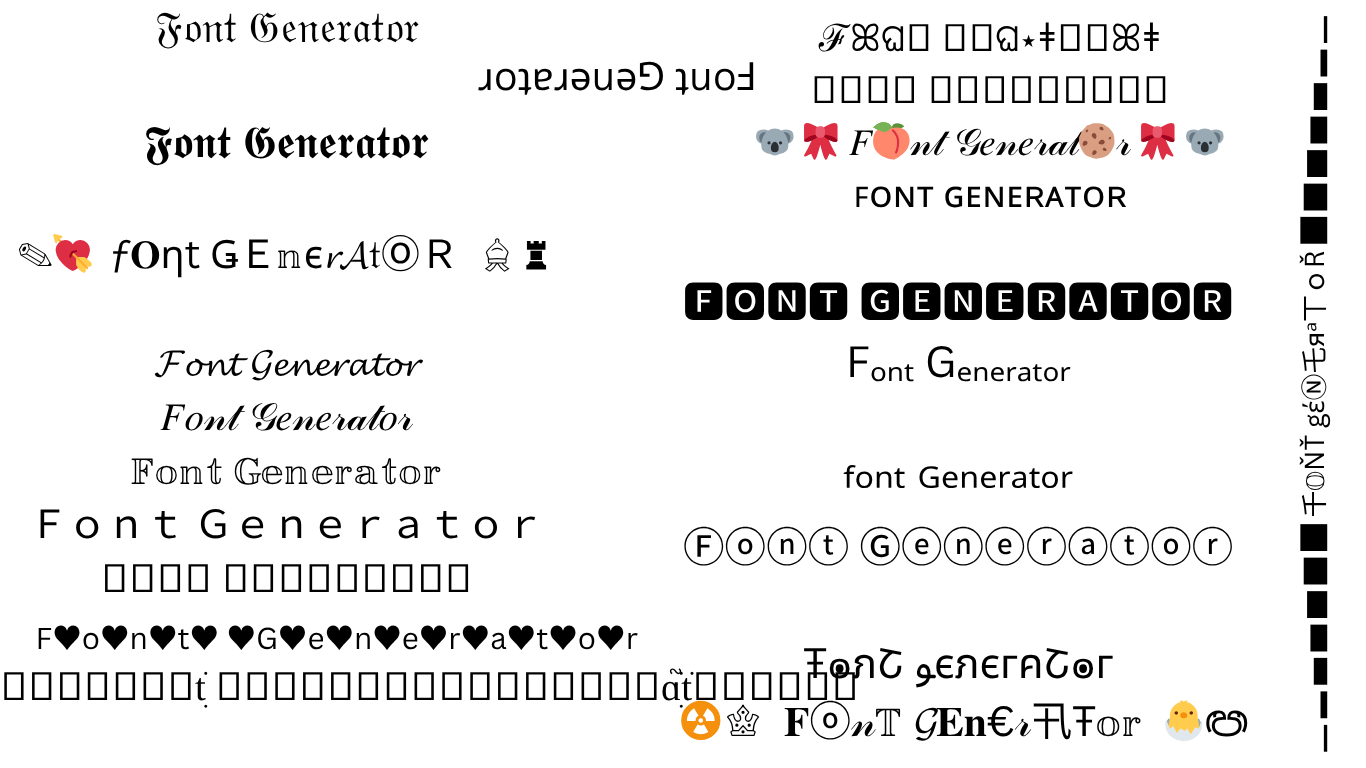
Fancy text makes your words look unique and noticeable online. The generator does this by replacing regular letters with symbols that look similar but have different designs.
For example, the simple phrase Cool Text can instantly change into many creative styles like:
- 𝒞𝑜𝑜𝓁 𝒯𝑒𝓍𝓉
- 𝔠𝔬𝔬𝔩 𝔱𝔢𝔵𝔱
- Cool Text
- 𝓒𝓸𝓸𝓵 𝓣𝓮𝔁𝓽
- 𝕮𝖔𝖔𝖑 𝕿𝖊𝖝𝖙
- 𝘊𝘰𝘰𝘭 𝘛𝘦𝘹𝘵
- 𝐂𝐨𝐨𝐥 𝐓𝐞𝐱𝐭
- 𝙲𝚘𝚘𝚕 𝚃𝚎𝚡𝚝
- 𝒞𝓞𝓞𝓛 𝒯𝐸𝒳𝒯
Each style gives a different feeling. Some look elegant and handwritten. You can mix and match styles depending on where you plan to use them.
You can use fancy text for:
- Instagram bios and captions to make your profile styling.
- YouTube titles or channel names that look creative and professional.
- Gaming usernames that make your name pop in leaderboards.
- Facebook posts to grab attention in comments and status updates.
- WhatsApp or Messenger messages to send something fun and expressive.
- TikTok captions and comments to make your content look stylish.
You just type your text in the box, scroll through the styles, and copy the one you like. It is fast, free, and does not need any app or login.
With just one click, you can give your words a completely new personality. Fancy text makes your message more eye-catching and helps your content get noticed everywhere you use it.
Why Choose Our Font Generator?
Choosing the right text generator can make a big difference. Some online tools are slow, full of ads, or limit your options. Our website provides you with a better experience because our tool is smooth, quick, and clean.
Furthermore, it works on every device imaginable. You do not have to be a designer to use this. You also do not need to have a paid account or any graphic software.
Features of Our Font Generator
Here is what makes our text generator one of the best tools for creating stylish text online.
1. Instant Text Conversion
When you type your text, the generator instantly transforms it into multiple font styles. You can scroll through the options and see how each style looks in real time. There is no waiting or extra steps.
2. Many Font Styles
The tool includes hundreds of creative styles such as cursive, bold, bubble letters, gothic, handwriting, small caps, and aesthetic fonts.
3. Works Everywhere
You can use the text generator on mobile, tablet, or computer. It works with Android, iPhone, Windows, and Mac. The website is fully responsive, so it adjusts perfectly to any screen size.
4. Customization Options
If you want to make your text even more unique, then you can mix letters, symbols, and emojis. You can use special characters to make names, quotes, and captions that look different from everyone else.
5. Safe and Free
Our text generator is completely free. You do not have to create an account or share any personal information. The tool does not store your text, so everything stays private and secure.
6. Unicode-Based Technology
The generator uses Unicode characters to create stylish fonts. These are special text symbols that look like fonts but work like regular text. That means you can copy and paste them anywhere without losing the style.
How to Use a Font Generator?
You can use a text generator. It is very easy. Here is a detailed guide to help you get started.
Step No 1: Visit the Font Generator Page
Firstly, you go to our site and open the text generator tool. You will see a text box on the screen.
Step No 2: Type Your Text
You can enter the word, sentence, or name you want to style. It could be your Instagram bio, a quote, or your business name.
Step No 3: Browse Different Font Styles
Below the box, you will see many styled versions of your text. Then, you can scroll through the list and check how your text looks in each style.
Step No 4: Choose Your Favorite Style
Once you find a design that you like, then click on it. You can preview it and confirm it fits your purpose.
Step No 5: Copy the Text
Click the “Copy” button to copy the styled text. The design will stay the same when you paste it somewhere else.
Step No 6: Paste It Anywhere
Then, you can go to the platform where you want to use your new text. Paste it in your bio, caption, chat, or title. The stylish format will appear right away.
Where to Use a Fancy Font Style?
Generating fancy text with the text generator or font maker is fun all on its own. You can try many styles and see how one small change in font gives your words a completely new feel. Some fonts look bold and powerful.
Fancy fonts are perfect for social media. You can make your Instagram bio or Facebook post look more stylish. People notice creative text because it catches the eye.
They also work great for gaming names. It helps your name pop out in leaderboards and chats. You can use these fonts on messaging apps too. It adds a little personality to your words.
They make your title or name look more professional and creative without any editing software. The fancy text generator works in your browser and is free to use. You just type, choose a style, and copy your favorite version.
What Is Unicode Text?
Unicode is the technology behind modern text on the internet. It gives each letter, symbol, or emoji a unique code that computers understand. When you use a text generator, it does not really create a new font file.
Instead, it replaces normal letters with Unicode symbols that look different but still act like text. That is why you can copy and paste them anywhere without losing the style.
For example:
- The letter “A” might be replaced with 𝓐 or 𝔄
- The letter “B” can appear as 𝐵 or 𝕭
This is how the tool gives you stylish results instantly. You do not need to install anything or change your keyboard.
Copy and Paste Text Styles
The most useful thing about our text generator is that it uses real text. That means you can simply copy and paste your styled words anywhere.
Here is how it helps to you:
- You can copy text directly to your clipboard with one click
- You can paste it into your social media bio, post, comment, or message
- The text keeps its style across different platforms
It is simple and fast. You do not have to worry about downloading fonts or using special apps. It is all done in your browser.
Pros
- Free to use with no limits
- No account or sign-in required
- Offers a huge collection of font styles
- Instant preview of each font
- Uses Unicode so it works almost everywhere
Cons
- Some Unicode symbols may not appear correctly on older devices
- Certain apps may not allow styled fonts in usernames
- Requires an internet connection to use
Why Font Style Matters?
The style of your text can change the way people see your message. Fonts are not just letters because they show personality. A bold style can make your words look strong and confident.
A cursive style can make them appear elegant and soft. Fun fonts can make your messages feel friendly and creative. A good font style adds visual impact and makes your audience pay attention.
Frequently Asked Questions (FAQs)
What is a Font Generator?
A font generator is an online tool that changes your regular text into stylish versions. You can copy and paste the result anywhere online.
Is this Font Generator free?
Yes, it is completely free to use. You do not have to sign up or pay for anything.
Do I need to install anything to use it?
No, it works directly in your browser. You only need an internet connection.
Can I use styled fonts on social media?
Yes, the fonts work on most platforms such as Instagram, Facebook, Twitter, TikTok, and YouTube.
What is Unicode in text?
Unicode is a system that helps devices to display letters and symbols properly. It allows the text generator to create fancy text that works almost everywhere.
Will the fonts work on all devices?
They work on most modern devices. Some older phones or apps may not show all styles correctly.
Is my text saved on your server?
No, the text you type is not stored or shared. Everything runs safely and privately.
Can I use the text for professional work?
Yes, you can use it in graphics, logos, headings, or branding content. It is ideal for both personal and business use.
Can I download the text as an image?
Yes, you can export it as an image for design or printing purposes.
Does the font generator work offline?
No, it requires an active internet connection to load styles and generate text.
Final Words
The Font Generator is the perfect tool. It is simple, fast, and completely free. You do not need to download anything or know design software. You can create beautiful, fancy, and professional-looking text for any purpose.